
How to Use Visual Cues to Stop Forgetting Your Habits: An ADHD Guide
15 Mar 26, 00:30
Visual Anchors & ADHD: Why Icons Beat Text for Executive Function
For the ADHD brain, there is a recurring villain that ruins even the best-laid plans: "Out of sight, out of mind."
In psychology, this is often linked to struggles with object permanence or working memory. If a task or habit isn't physically in your field of vision, it effectively ceases to exist. This is why traditional habit trackers—which often rely on long, gray lists of text—frequently fail neurodivergent users. We don’t just "forget" the habit; we become "blind" to the text itself.
To build consistency, you don't need more willpower. You need Visual Anchors.
The Problem: "Text Blindness" and Executive Function
When you are overwhelmed, your executive function is already running on low battery. Reading a list of words like "Meditate," "Drink Water," and "Journal" requires the brain to decode language, recall the intent behind the word, and then decide to act.
This creates "friction." For an ADHD brain, even a tiny amount of friction is enough to trigger a distraction.
We've previously discussed how habit tracking apps can help you achieve your goals faster, but the tool only works if your brain can actually process the information without burning out.
Recognition Over Recall
Humans process images roughly 60,000 times faster than text. By replacing a word with a specific icon, you move from Recall (trying to remember what to do) to Recognition (instantly knowing what to do).
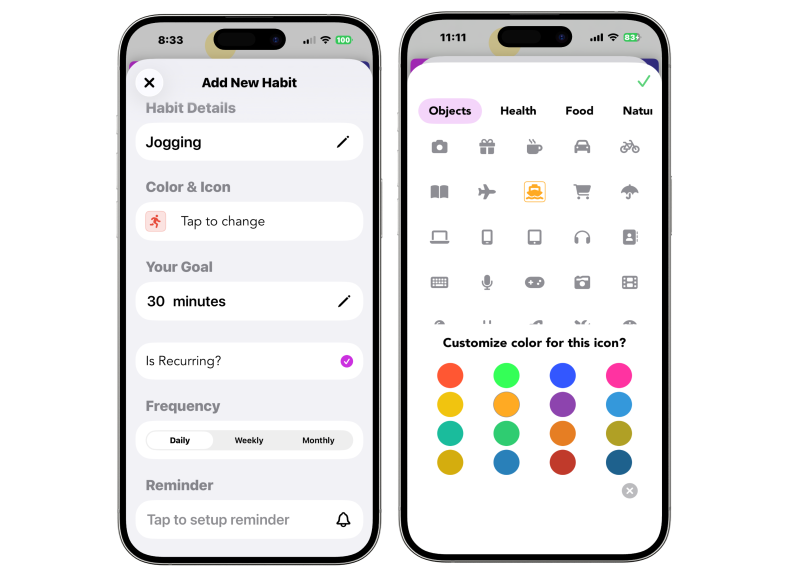 Our new Icon and Color Picker allows you to create instant visual triggers for every habit.
Feature Spotlight: The Icon & Color Customizer
In our upcoming March 24 update, we are leaning heavily into the science of visual anchors. Our new icon picker allows you to move past generic checkboxes and toward a Visual Map of your life.
1. Categorizing by Color
Using the color picker isn't just about aesthetics; it’s about cognitive categorization. You can set all "Health" habits to Green, "Work" habits to Red, and "Self-Care" habits to Purple. When you open the app, your brain instantly knows the "vibe" of the tasks remaining based on the color density.
2. Specificity Breeds Action
Using a "Tooth" icon for brushing teeth or a "Laptop" for deep work provides an immediate mental image of the action.
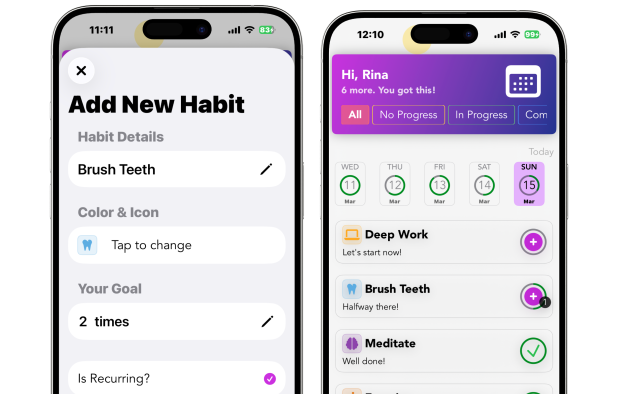 Combining specific icons with our + system for a clear, visual goal.
When you pair these icons with our countable habit system, you create a visual scoreboard. Seeing a "2x" next to a Water Drop icon is a much stronger directive than a simple "Drink Water" text reminder.
Solving Object Permanence with Widgets
The biggest leap forward in the March 24 update is the introduction of Home Screen Widgets.
For ADHD users, the "Home Screen" is the most valuable real estate on their phone. If your habits are buried inside an app icon, they are invisible. By placing a widget directly on your screen, you create a permanent visual anchor that you see every time you unlock your phone.
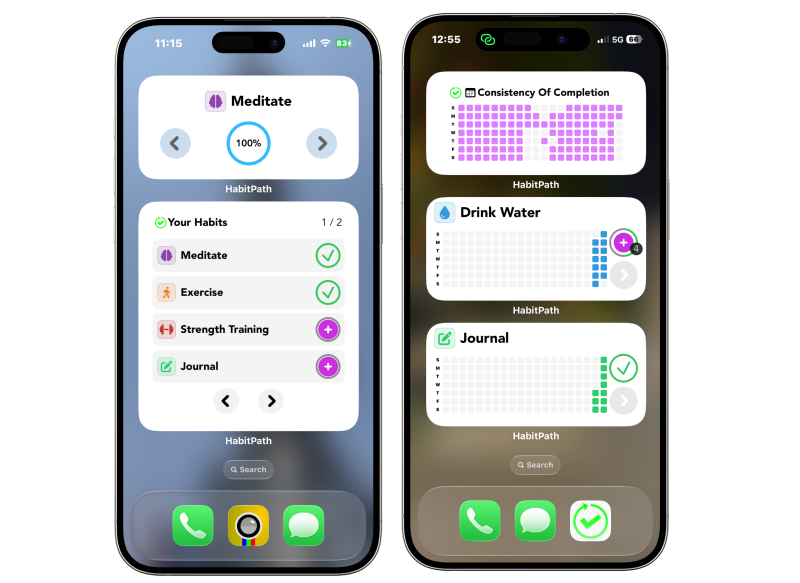 The new HabitPath Widget puts your 'Visual Brain' front and center.
This acts as a "passive nudge." You don't need a loud, intrusive alarm (though custom ADHD reminders are still vital for time-blindness); you just need a visual reminder that your progress is happening.
Novelty: The Secret Weapon Against Boredom
ADHD brains crave novelty. One of the reasons we stop using apps is that they become "part of the furniture"—we get used to them, and they become invisible.
By allowing you to easily change your habit icons and colors, HabitPath lets you "refresh" your dashboard whenever you feel the dopamine hit wearing off. This ability to pivot and change your setup is exactly why we believe habit tracker streaks are toxic. Consistency isn't about looking at the same boring list for 365 days; it’s about staying engaged with the process in a way that feels fresh and rewarding.
How to Set Up Your Visual Map (Step-by-Step)
To get the most out of the new update, we recommend this "Visual First" setup:
- Assign High-Contrast Colors: Use your most vibrant color for your most difficult habit.
- Use Search for Niche Icons: Our new search feature helps you find the exact symbol that resonates with your personal goal.
- Place the Widget on Page 1: Don't hide your progress. Put the HabitPath widget on your primary home screen.
- Audit Weekly: If you find yourself ignoring an icon, change it! A new color or a different symbol can "re-wake" your brain's interest.
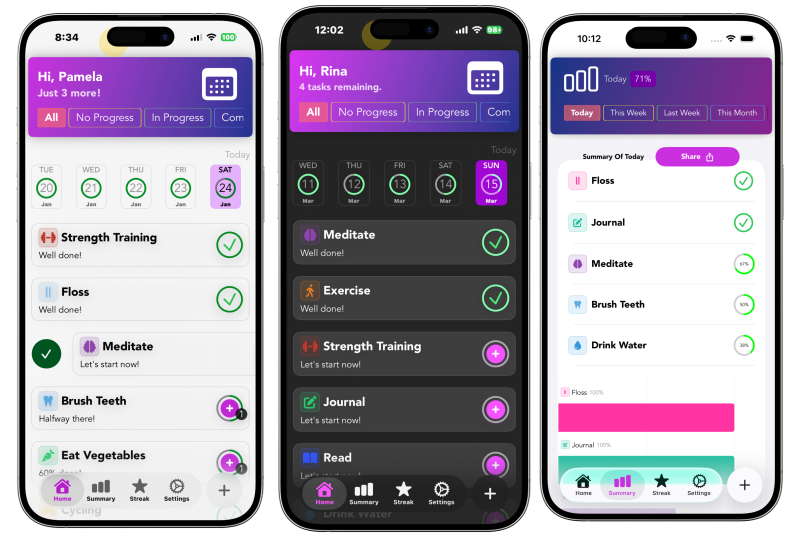 Your final dashboard: A clean, color-coded map of your day.
Summary: Designing for Your Brain
You don't have to fight your brain's preference for visuals. By using icons, colors, and widgets, you are working with your neurobiology instead of against it.
The March 24 update is our biggest step yet in making HabitPath the most ADHD-friendly habit tracker on the market. We can't wait for you to build your own visual map.
Ready to start building your visual anchors? Download HabitPath on the App Store today!